
Advanced Reports
Advanced Reports
Overview
The Advanced Reports feature in BloomNation offers a suite of comprehensive reports designed to help you monitor sales, analyze customer trends, track taxes, and assess product performance. These reports provide valuable insights, allowing you to make data-driven decisions and optimize your business.
With most reports updating hourly, you’ll have near real-time data at your fingertips, making it easy to track changes and generate exports to meet your business needs.
Accessing Advanced Reports
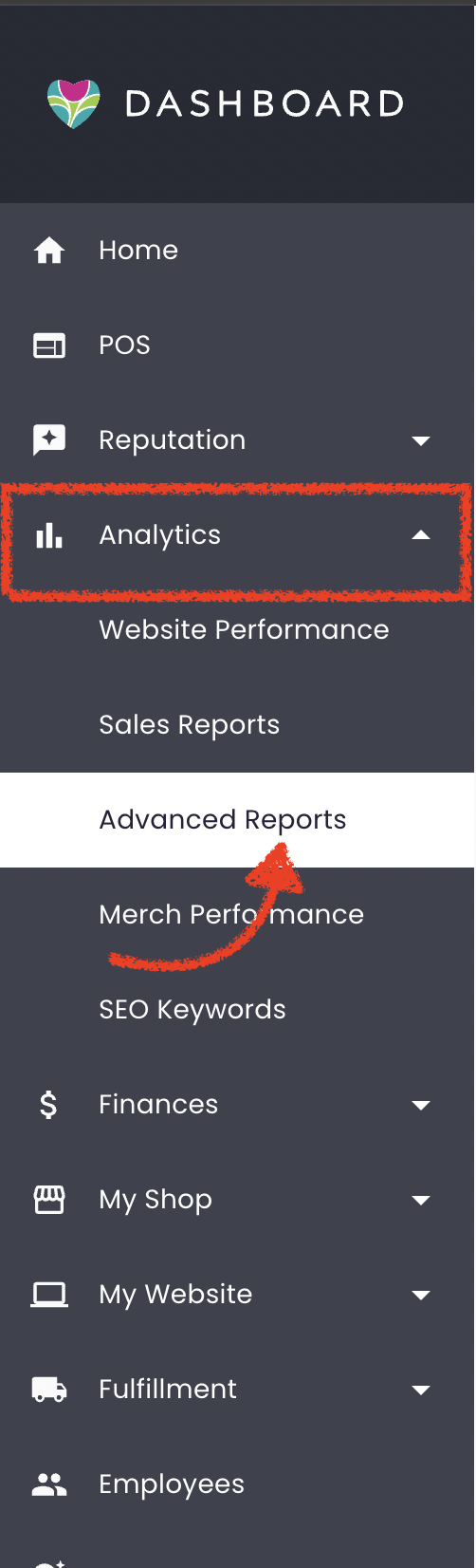
To access Advanced Reports:
- Log in to your BloomNation account.
- Navigate to the Analytics tab.
- Click on Advanced Reports.
Once inside, you’ll find various report categories organized to simplify your search and analysis process.
Report Categories
Each category below corresponds to the sections in the Advanced Reports tab and includes links to detailed Help Center articles for each report, along with a brief description to guide you. These categories serve unique purposes, enabling you to analyze different aspects of your business for better decision-making.
Sales Reports
Sales Reports provide insights into your revenue and transaction patterns. Use these reports to track daily and hourly sales activity, analyze sales by order type, and manage refunds or disputes.
- Daily Sales History Report: Track daily sales activity, offering an at-a-glance overview of each day’s performance.
- Full Sales History Report: Provides a complete history of sales within a specified date range, perfect for periodic reviews or comprehensive audits.
- Hour by Hour Sales Report: Analyzes sales by hour, helping you identify peak shopping times.
- Sales Summary Report: Summarizes overall sales metrics, with breakdowns by order type, order source, and payment type.
- House Account Sales Report: Tracks sales specifically for House Accounts, helping you monitor activity among your account-based customers.
- House Account Aging Report: Show outstanding balances for your House Accounts grouped by days overdue.
- Refunds Report: Lists all issued refunds, along with corresponding order numbers, for any selected date range.
- Chargebacks Report: Displays all disputed transactions and chargebacks, helping you track and manage these incidents.
Tax Reports
Tax Reports provide essential data for tax reporting and compliance. These reports streamline tax preparation, so you can easily monitor tax amounts collected over time.
- Sales Tax Report: Summarizes sales tax information to assist with state tax remittance, providing visibility into sales tax amounts by date range.
- Sales Tax by Orders Report: See tax data broken down by individual orders for a selected date range. This report includes details like subtotal, sales tax, and grand total for each order.
Customer Reports
Customer Reports focus on customer activity and spending trends. Use these reports to identify high-value customers, track order frequency, and review customer contact information.
- Customer List Report: Provides a list of active customers, including total number of orders, average spend, and lifetime value.
- Customer Spending Report: Summarizes each customer’s total spending and order count within a specified date range, ideal for identifying high-value customers.
Product Reports
Product Reports allow you to analyze sales data by individual product or category. These insights help you understand product popularity, inventory demands, and category-level performance.
- Product Analysis Report: Breaks down sales data by individual product, allowing you to assess product popularity and performance.
- Product Categories Report: Displays sales data by product category, helping you understand which categories contribute most to overall revenue.
Need Assistance?
If you have any questions or need help with a report, please reach out by submitting a support ticket here.