
Discounts, Promo Codes, and Coupons
 How to Edit Coupons & Discounts
Coupons and discount codes help you sell excess products, increase customer loyalty, boost traffic to your website, and pull in customers. Whether offered on social media, or to an exclusive group of your favorite customers via email, offer online discounts via coupon or “promo’ codes to help achieve inventory management, brand building, and low-cost marketing all at once.
*Please note, any discounts promoted by BloomNation (such as on our social media) will never be applied at your expense.
How to Create Coupons:
1. Log into your BloomNation Dashboard.
2. Go to My Shop > Coupons.
3. Select the "Create Coupon" blue button at the top right corner of the page.
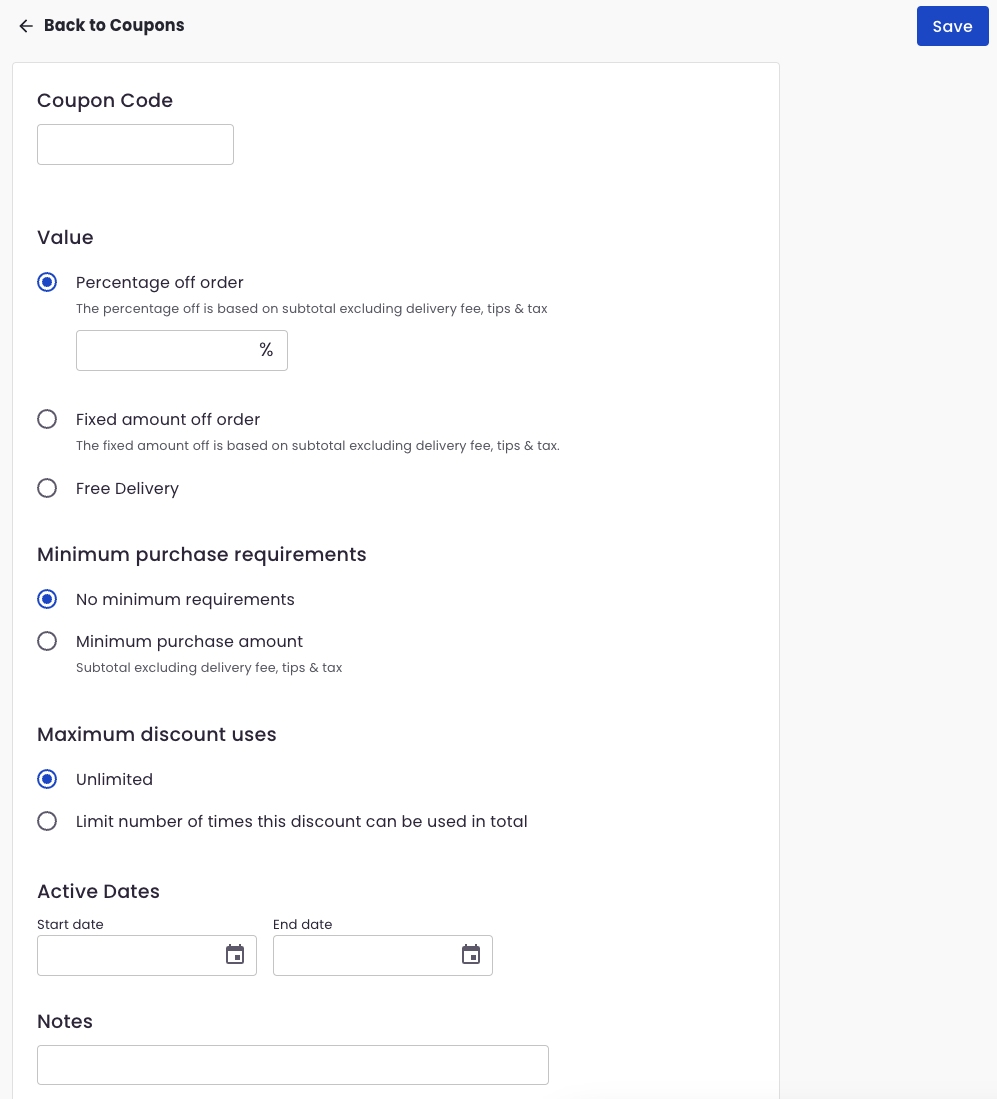
4. Fill out the form.
4a. Coupon Code - what you want your customer to type in during checkout.
4b. Value - you can set what the coupon code will do once applied to an order:
- Percentage off order - for example: 10% off the subtotal of the order (excluding delivery fee, tips & tax)
- Fixed amount off order - for example $5 off the subtotal of the order
- Free delivery - will set delivery free to $0
4c. Minimum purchase requirements - if you want to set a specific amount to be met before the coupon is applicable to the order
4d. Maximum discount uses - if you want to limit how many times the coupon code can be used. For example, if you set this to 50, then the coupon will only work for the first 50 orders that used the coupon.
4e. Activate Dates - set the date range your customers are able to use this coupon.
4f. Notes - optional field for any notes on the coupon.
For further assistance, please reach out to BloomNation Support team by submitting a ticket.