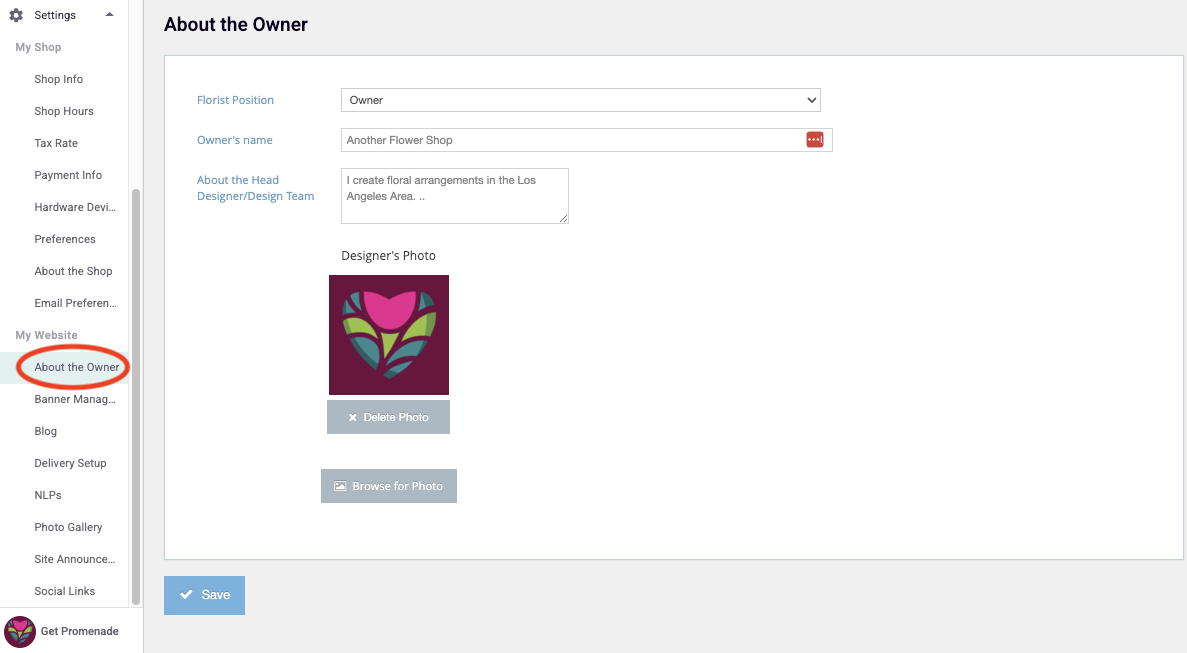
About the Owner
Updated
As a member of the BloomNation community, you have the advantage of connecting with customers and fellow florists as a person and as an independently owned business. The About The Owner tab allows you to explain who you are and why you’re in the floral business.
Follow these steps to get started:
- Log in to your Dashboard .
- Click Settings tab on your left hand navigation bar
- Click on the About the Owner tab, shown under the 'My Website' Settings subcategory
- Enter the title of the person you’d like to describe (Owner, Head Designer, etc) in the Floral Position field
- Enter their name in the Head Designer name field
- In the About the Head Designer/Team field include at least 200 words about what makes that person special to your business. This is where you’ll want to describe your/their experiences, awards, design philosophy, accreditations, etc.
- Proofread! Make sure you check for spelling and grammar errors.
- Press Save
The last step is to upload a Designer’s Photo that clearly shows your/the person’s face as in the examples below. Use a .jpg or .png image file that is around 400 x 400 pixels, with a resolution of at least 150 jpg or png.
Once you have a great pic upload it by:
- Clicking Browse for Photo, then double-clicking the photo file you want to display.
Don’t forget to save!