
Google Short Names
Just like the name you have on Instagram, Pinterest, or Facebook, business owners can now claim a short name and URL for their business. With this short name, businesses can easily refer customers back to their Google profile to catch up on latest updates, to make a booking or to write a review after a visit. Google says that in the coming months, people will also be able to search short names in Google Maps!
To register your Google My Business short name
1. Log in to your Google My Business Account
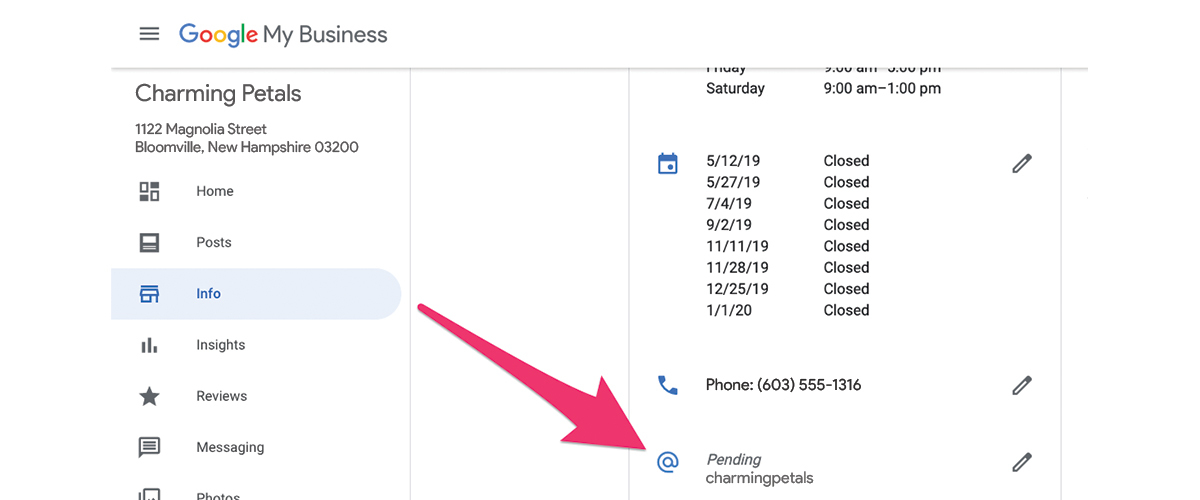
2. Click on Info in the Main Menu on the left
3. Scroll down until you see the "@" sign below your phone number. Click ic_edit_outline_hollow_24px.svgto edit.
4. Pick a short name that represents your brand (up to 32 characters.)
- If your name isn’t available, you’ll receive an error message and have to choose a different name. Try abbreviating your name or adding other descriptions, like your location. (e.g, EnchantedFlowersNE)
5. Click Apply. Your short name will show as pending, and when it’s ready, it’ll show on your Business Profile.
Note
If you have more than one location, you'll have to claim each location's short names separately
How to create a short name
Your selected short name should be associated with your business name or the name by which people commonly refer to your business. We recommend including your location to make the short name more distinct. For example, you can use your business name with your location, like your city or neighborhood (e.g, EnchantedFlowersNE).
Keep your short name simple so you can easily promote it, and customers can remember it. If you have a short name, you’ll get a short URL to request reviews from your customers. Learn more about short URLs for reviews.
- Sign in to Google My Business.
- Next to your current short name, click ic_edit_outline_hollow_24px.svgto edit.
- Remove your short name, and create a new one. Then, click Apply.
How to change your short name
Important: After changing your short name, there’s no guarantee your original name will be available later.
- Sign in to Google My Business.
- Next to your current short name, click ic_edit_outline_hollow_24px.svgto edit.
- Remove your short name, and create a new one. Then, click Apply.
Flag name for review
Users and business owners can flag a name for impersonation, offensive, fake, spam, or inappropriate content issues.
- On your computer, go to the Business Profile.
- Click Suggest an edit > Remove this place.
- Choose the reason for the removal.
- Click Submit.
Note: For legal issues, like copyright or trademark disputes, submit a report directly to Google!
Policies for short names & URLs
All custom names and URLs must adhere to the following Google policies:
- Google Terms of Service
- Google My Business Additional Terms
- Google My Business policies for representing a business on Google
- Maps User Content Policy
What if I still have questions?
You can read more about Google short names on Google's Help Center. If you still have questions, you can reach a Bloom Expert by submitting a ticket here !